Clubly: merchant console for digital loyalty programmes

Paper stamp cards are still the default loyalty mechanic for most small, independent businesses like cafés, salons, bakeries, bike shops… They're cheap and simple, but when was the last time you actually fished one out of your wallet? They break down easily, cards get lost or forgotten at home. And on the business side, staff have no record of who's actually a repeat customer, and the business owner has zero visibility into whether the program is even working.

This project and case study are still in progress. You can find some reasonings and previews here.
But for more feel free to get in touch!

This project and case study are still in progress. You can find some reasonings and previews here. But for more feel free to get in touch!

This project set out to answer: what does a digital stamp card look like when it has to work for three different people at once, the customer collecting stamps, the staff member issuing them in a five-second checkout interaction, and the owner trying to run a small business without becoming a loyalty-program administrator?

Research

Talking to five people before designing for any of them

To get past assumptions, I ran five short interviews before designing anything: three with people who regularly use loyalty programs, two with a coffee and boba shop currently running paper-based ones that I visit often.

That breaks down into three separate trust problems:

Forgetting or losing the physical card is the single biggest drop-off point for customers

Every customer interviewed had at least one abandoned card (yes, including me)

Passive visibility matters more than active engagement

Customers didn't want to "check the app," they wanted the information to already be there when
they happened to look

Speed at the counter is non-negotiable for business adoption

The business owner's past bad experience with a slower competitor was the single strongest signal that the counter interaction had to be faster than paper, not just digital

Owners want visibility they've never had, but don't want a complicated dashboard

"Just tell me if it's working" came up in both owner interviews in some form

personas

Three people, one system that has to work for all of them

The research didn't just produce findings, it produced three distinct relationships to the same programme. The console had to work for an owner who'd never see a stamp scanned in person, a staff member with ten seconds and both hands full, and a customer who wanted to think about the programme as little as possible.

goals

Give small businesses real visibility into a loyalty programme, without asking customers to do anything they don't already do

Make the counter interaction faster than handling a paper card

Give business owners a small set of clear metrics they've never had access to before

Give customers passive visibility into their progress without requiring them to open the app.

process

Defining the core interaction model

The most consequential early decision was who scans whom. A static QR code that customers scan themselves is simpler to build, but removes the one thing paper stamping already has going for it: a staff member has to look at the situation and decide to stamp.

I chose the reverse: the customer generates a short-lived code, staff scan it. This kept a human in the loop on every stamp without adding a step to the transaction, directly responding to the business owner's experience of losing a program to counter friction.

design process

Setting up a business shouldn't feel like a support call

The Business Page is where a merchant defines their public identity: name, tagline, description, logo, cover image, brand colour, and a QR code style that carries into print. Every change reflects instantly in a live preview of what the customer sees.

The owners I interviewed had no design background and no patience for abstraction. Without a live preview tied directly to the controls, someone would publish a brand colour or a QR code they'd never seen rendered.

process

One business, several locations, one shared source of truth

Clubly needed to support businesses with more than one shop from day one. The coffee shop owner I interviewed already ran two. Each location gets its own address, hours, staff, and QR code, but rolls up into shared programmes and shared reporting. A location isn't a separate account. It's a filter on the same data.

The location detail page stays deliberately narrow: hours, contact info, staff assigned to that spot, a map, a printable QR code. Everything a manager needs to run that one shop, nothing that belongs at the business level.

process

The programme builder is where the paper card actually gets replaced

This is the core of the product, and the screen I spent the most time on. A business owner defines the reward, sets how many stamps it takes, picks stamp icons and a wallet accent colour, and chooses whether the programme runs at every location or just some.

Two details came directly from the interviews. Stamp expiry lapses old, abandoned cards after inactivity, but only after the customer's been warned first, since losing progress silently was the exact frustration that killed paper cards for people. And bonus stamps, starting with a birthday bonus, turn the programme into something a business can tune on its own, without a developer every time they want to try something.

Stamp customization goes past a single icon choice: separate empty and stamped icons, custom uploads, and Wallet pass colors that match the brand instead of a generic default. A live preview updates with every change, showing the loyalty card exactly as a customer's wallet would render it, which matters given how much of the interview feedback came back to trust in a system owners couldn't yet see working.

process

Visibility without a spreadsheet

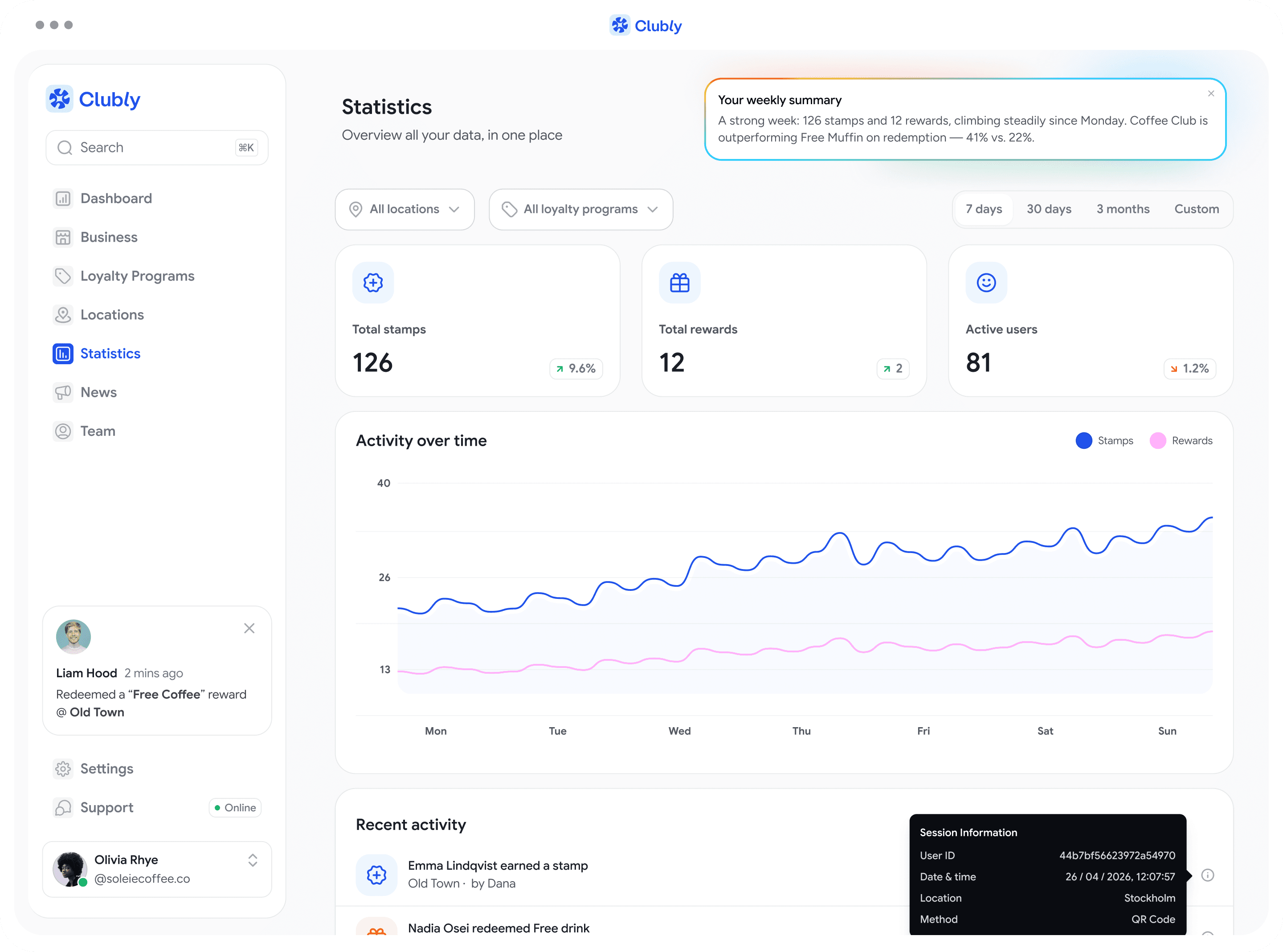
The dashboard and the deeper Statistics page trace straight back to "just tell me if it's working." The dashboard leads with three numbers (stamps, rewards, active users), each with a plain percentage change, plus a live feed of what just happened, by name. To simpli

An AI-generated weekly summary sits at the top of the page, a few plain sentences on what changed: stamps and rewards trending up, which programme is winning on redemption, anything worth a second look. Same "just tell me if it's working" instinct, applied to the page itself, so an owner reads three sentences instead of comparing a chart, a table, and an activity feed by hand.

what's next

The first screens of the staff and customer apps

The console was just the first part. Once it was stable, I sketched the first prototype screens for the staff scanning app and the customer app, the two pieces that had only existed as research findings until then. Neither is built yet, but they're the first proof the research holds up once it hits a real screen.

Staff app

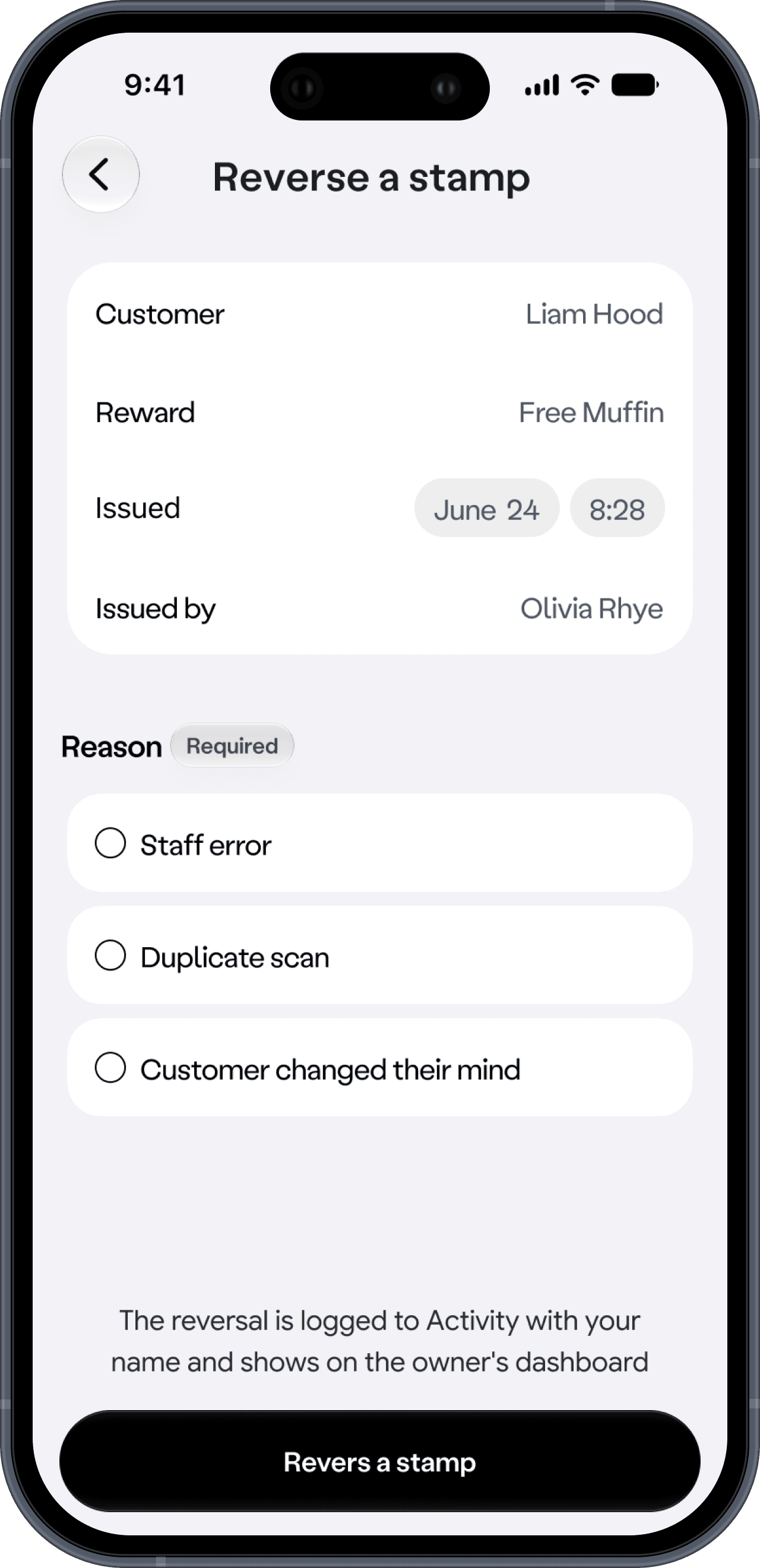
The staff side turns "speed at the counter" into one motion: point the scanner at a customer's QR code, and a sheet slides up with their name and current progress. One tap gives a stamp. The code itself refreshes every 60 seconds, so a screenshotted QR can't be reused later. A stamp or reward can be undone right after it's given, and a later reversal requires a reason first. Staff error, duplicate scan, or customer changed their mind… which feeds directly into the audit trail already built into the console.

Customer app

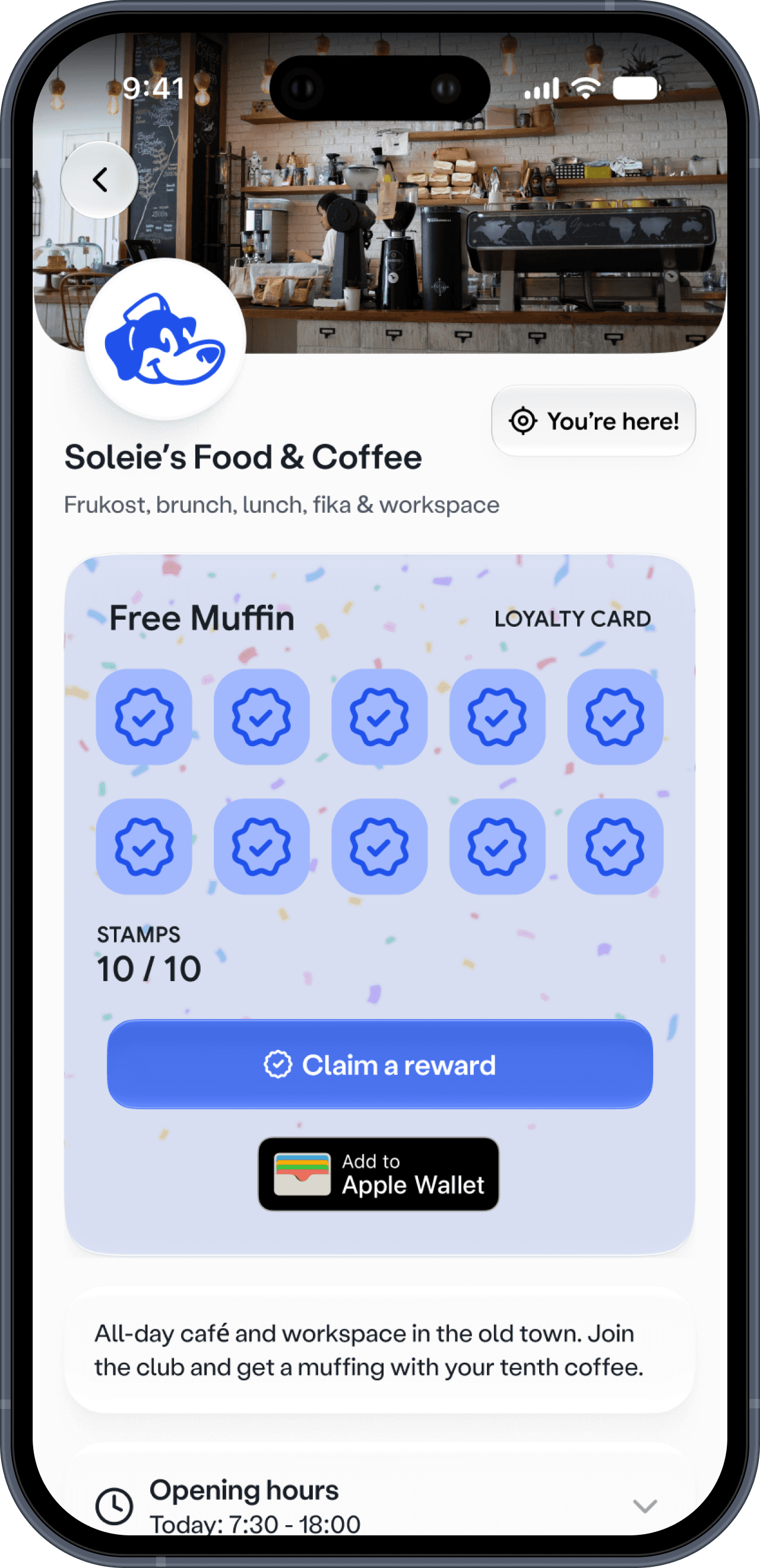
The customer side replaces the drawer of cards with one wallet and a map. A home screen lists every stamp card someone's collecting. A Discover tab surfaces nearby businesses with rewards, straight from the finding that the card needed to live in the account, not as a physical object. And Add to Apple Wallet puts the stamp count exactly where the passive-visibility finding said it needed to be: somewhere a customer would glance at anyway.